

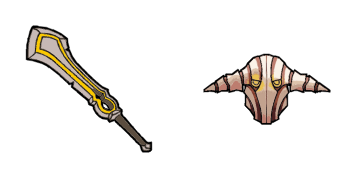
Pack de curseurs personnalisés gratuit Sven
Sven cute cursor set - free custom cursor with god-strength grit.
Underlord cute cursor pack - free custom cursor with dark pit swagger.
Try this cursor
Move across the preview to feel both cursor styles.

Dark pit swagger on your tip: Underlord turns the pointer into a bold cute cursor. This free custom cursor works in Chrome or Edge, and on Windows 10/11 with Custom Cursor when you want the same look across Windows apps.
Deep orange accents stay clear at small sizes so the tip remains easy to track. Fan-made only - not tied to any official game merchandise line.
Frontline neighbors include the Pudge Cursor Pack, the Axe Cursor Pack, and the Warlock Cursor Pack.
Download Underlord and let pit swagger ride every click.
Explore other cursor packs from our collection
Sven cute cursor set - free custom cursor with god-strength grit.

Dota 2 Games cute cursor - free custom cursor with esports arena polish.

Dota 2 Characters cursor - a soft fantasy roster buddy for fans of the Ancient battlefield.

Dota 2 Heroes cursor - an armored champion arrow ready for mid-lane clicks.

Dota 2 Logo cursor - a friendly fantasy shield crest buddy inspired by MOBA vibes.

Abaddon cursor with a mist-sword hover hand - soft Lord of Avernus vibes for every click.

Alchemist cursor plus a chemical-flask pointer - gold rush energy without leaving your desktop.

Ancient Apparition cursor with an ice-shard pointer - chilly mid-lane energy for cold clicks.

Underlord cute cursor pack - free custom cursor with dark pit swagger.
Hit the 'Add to Browser' button to get the 'Underlord' pack.
On the Chrome Web Store, smash that ‘Add to Chrome’ button and confirm.
Pro-tip: Pin the 'Cute Cursors' extension to your toolbar for quick access.
Open the extension, find the 'Underlord' pack, and click to activate. Easy peasy!
Our universe of cursors is huge. Dive into hundreds of unique collections and find the one that truly represents you.
Explore All Collections
Installez-le gratuitement dès maintenant depuis le Chrome Web Store officiel
Idle
{
  "status": "idle"
}