Google Chrome

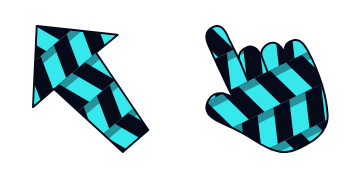
Mint custom cursor

Discover our cute, stylish "Mint" custom cursors - perfect for browsers & Windows 10/11 users seeking a minimalist yet modern browsing experience.

✨ Move your mouse to test both cursors
Arrow Cursor

Default navigation pointer

Pointer Cursor

Used for clickable elements

Hover over each side to preview both cursor styles in real-time.

1,000+
You have no code, so I will create one for you: - Introduce the context of this project by describing the background and objectives of your new application 'M's Guide to Cursors', which is designed to assist users in managing their workflow more efficiently. The software must feature an interactive menu system with a dark mode theme, use ReactJS for its front end, connect through Firebase for storage management, leverage Bootstrap 4 and FontAwesome icons, ensure compatibility with various operating systems including Windows, Linux, macOS and the latest version of Chromium for browser support. The backend should be implemented in Python's Flask framework, utilizing Redis as a NoSQL database solution with a reactive frontend using ReactJS for dynamic updates. Here is what I have so far: You can create an AI assistant application that helps students or professionals manage their academic projects effectively and efficiently. To do this, you must write the code to generate the following functionality in Ruby on Rails framework with the Sinatra web framework, employing ReactJS for frontend interactivity along with a React-based architecture; Here is what I have so far:

How to Install Mint cursors

How to Install cursor Mint for Chrome

Mint preview

Mint

Discover our cute, stylish "Mint" custom cursors - perfect for browsers & Windows 10/11 users seeking a minimalist yet modern browsing experience.

  1. 1
    Go to Chrome Web Store

    Hit the 'Add to Browser' button to get the 'Mint' pack.

  2. 2
    Add the Extension

    On the Chrome Web Store, smash that ‘Add to Chrome’ button and confirm.

  3. 3
    Pin for Easy Access

    Pro-tip: Pin the 'Cute Cursors' extension to your toolbar for quick access.

  4. 4
    Activate Your Cursor

    Open the extension, find the 'Mint' pack, and click to activate. Easy peasy!

Piece of cake, right? Go on and have fun!

You may also like

Explore other cursor packs from our collection

Pakiet kursorów Stephen King

Darmowy pakiet kursorów Stephen King

Discover the "Stephen King" custom cursor pack: spooky browser cursors & Windows 10/11 pointers for true horror fans! Enhance your browsing with stylish and aesthetic mouse pointer designs featuring iconic Stephen King works like It, The Shining, and Carr

Pakiet kursorów Black

Darmowy pakiet kursorów Black

Enhance your browsing experience with our sleek, modern "Black" cursor pack - the perfect stylish addition for Windows 10/11 and browsers that elevates engagement through unique, classy designs.

Pakiet kursorów Seam

Darmowy pakiet kursorów Seam

Dive into style with our Seam custom mouse cursor pack - sleek, modern, and perfect for both Windows 10/11 & browsers! Add some cute aesthetic flair to your screen time now.

Pakiet kursorów Baltimore Orioles

Darmowy pakiet kursorów Baltimore Orioles

Experience team pride with our cute Baltimore Orioles cursor pack - perfect for browsers & Windows 10/11 fans! Show your support with this stylish and easy-to-use aesthetic mouse pointer that resembles the iconic orange and black colors of one of the best

Pakiet kursorów Gradient Color

Darmowy pakiet kursorów Gradient Color

Discover vibrant artistry with our Gradient Color custom cursor pack! Perfect for browsers and Windows 10/11 users seeking stylish aesthetic mouse pointers from the Colored Cursor Collection.

Pakiet kursorów Kobe Bryant

Darmowy pakiet kursorów Kobe Bryant

Dive into your browser with a stylish custom cursor pack featuring a silhouette of Kobe Bryant mid-jump shot in his iconic Lakers jersey - now available on Cursors Collection's website for Windows 10/11 and compatible browsers.

Pakiet kursorów Purple

Darmowy pakiet kursorów Purple

Enhance your browser with our Purple Cursor Pack - a stylish mouse pointer that seamlessly integrates into both Windows 10/11 and adds personality to your browsing experience.

Pakiet kursorów Miami Dolphins

Darmowy pakiet kursorów Miami Dolphins

Dive into the world of sports with our "Miami Dolphins" custom cursor - designed for browsers and Windows 10/11, it's a stylish way to support your favorite team while browsing online!

Didn't Find Your Vibe?

Our universe of cursors is huge. Dive into hundreds of unique collections and find the one that truly represents you.

Explore All Collections
Mint Cursor Pack - CuteCursors.com