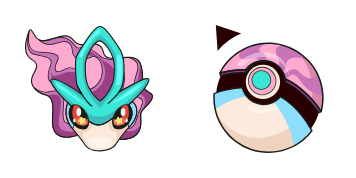
Kyogur cursor

Kyogur - Custom Cursor und cute Cursor für den Browser.

Try this cursor

Move across the preview to feel both cursor styles.

Kyogur cute cursor pack preview
Hover these
Auto · default + hover
97
Suchen Sie nach einem einzigartigen und auffälligen Cursor für Ihren Browser? Schauen Sie sich den Kyogre Cursor aus der Cursors Collection an! Dieser Cursor verfügt über den legendären Pokemon Kyogre, mit seinem ikonischen blauen Körper und heftigen Ausdruck. Es ist perfekt für Pokemon-Fans, die ihre Liebe zum Franchise zeigen möchten, während sie im Web surfen. Plus bietet die Cursors Collection eine Vielzahl anderer lustiger und kreativer Cursors zur Auswahl, so dass Sie Ihr Surferlebnis so anpassen können, wie Sie möchten. Geben Sie dem Kyogre Cursor einen Versuch und sehen Sie, wie es Ihre Online-Erfahrung verbessern kann!Wenn Ihnen dieses Cursor-Paket gefällt, hat die Kollektion Pokemon noch mehr interessante Optionen für Sie.

You may also like

Explore other cursor packs from our collection

Entdecken Cursor-Paket

Entdecken Cursor-Paket

Entdecken - Custom Cursor und cute Cursor für den Browser.

Ansehen
Groundon Cursor-Paket

Groundon Cursor-Paket

Süßer Cursor Groundon - kostenloses Custom Cursor Set für den Desktop.
Ansehen
Selbstmord Cursor-Paket

Selbstmord Cursor-Paket

Selbstmord - Custom Cursor und cute Cursor für den Browser.

Ansehen
Pokemon: Mew Cursor-Paket

Pokemon: Mew Cursor-Paket

Süßer Cursor Pokemon: Mew - kostenloses Custom Cursor Set für den Desktop.

Ansehen
Pokemon: Mew i Mewtwo Cursor-Paket

Pokemon: Mew i Mewtwo Cursor-Paket

Pokemon: Mew i Mewtwo: soft cute Cursor im fertigen Custom Cursor Pack.
Ansehen
Pokemon: Mewtwo Cursor-Paket

Pokemon: Mewtwo Cursor-Paket

Wähle Pokemon: Mewtwo - cute Cursor und Custom Cursor ohne Ballast.
Ansehen
New Year: Pokemon Mewtwo Cursor-Paket

New Year: Pokemon Mewtwo Cursor-Paket

New Year: Pokemon Mewtwo: süßer Cursor und Custom Cursor Pack für Browser und Windows.

Ansehen
Pokemon Lugia Cursor-PaketA

Pokemon Lugia Cursor-Paket

Lugia: cute cursor pack and free custom cursor for legendary fans.

Ansehen

How to Install Kyogur

How to Install cursor Kyogur for Chrome

Kyogur preview

Kyogur

Kyogur - Custom Cursor und cute Cursor für den Browser.

  1. 1
    Go to Chrome Web Store

    Hit the 'Add to Browser' button to get the 'Kyogur' pack.

  2. 2
    Add the Extension

    On the Chrome Web Store, smash that ‘Add to Chrome’ button and confirm.

  3. 3
    Pin for Easy Access

    Pro-tip: Pin the 'Cute Cursors' extension to your toolbar for quick access.

  4. 4
    Activate Your Cursor

    Open the extension, find the 'Kyogur' pack, and click to activate. Easy peasy!

Piece of cake, right? Go on and have fun!

Didn't Find Your Vibe?

Our universe of cursors is huge. Dive into hundreds of unique collections and find the one that truly represents you.

Explore All Collections