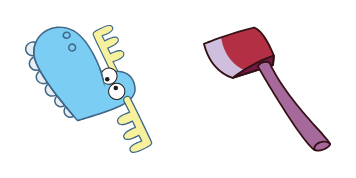
Cuddles cursor

Cuddles: süßer Cursor und Custom Cursor Pack für Browser und Windows.

Try this cursor

Move across the preview to feel both cursor styles.

Cuddles cute cursor pack preview
Hover these
Auto · default + hover
90
Cuddles ist ein liebenswerter Cursor aus der Cursors Collection, der Ihr Surferlebnis unterhaltsamer und gemütlicher macht. Dieser süße Cursor verfügt über einen fluffigen weißen Teddybären mit einem rosafarbenen Herzen auf dem Bauch, der ein rotes Herz hält. Es ist perfekt für alle, die ihrem Computer einen Hauch von Cuteness hinzufügen möchten! Außerdem ist es einfach zu installieren und zu bedienen - laden Sie es einfach von der Cursors Collection-Website herunter und genießen Sie es, sich mit Ihrem Cursor zu umarmen, während Sie im Web surfen.Schauen Sie in die Kollektion Happy Tree Friends, um noch mehr exklusive Cursor-Pakete wie dieses zu entdecken.

You may also like

Explore other cursor packs from our collection

Mime Cursor-Paket

Mime Cursor-Paket

Probier Mime: süßes Cursor Pack und fertige Custom Cursors.

Ansehen
Petunia Cursor-Paket

Petunia Cursor-Paket

Petunia glossy cute cursor - free custom cursor with woodland charm.

Ansehen
Giggels Cursor-Paket

Giggels Cursor-Paket

Giggels Custom Cursor Pack mit süßem Cursor für Fans des Themas.

Ansehen
Happy Tree Friends Petunia Cursor-PaketA

Happy Tree Friends Petunia Cursor-Paket

Free custom cursor: Animated Petunia cute cursor with soft hand-drawn detail.

Ansehen
Flippy Cursor-Paket

Flippy Cursor-Paket

Flippy Cursor Pack mit cute Cursor Stil für Chrome, Edge und Windows.

Ansehen
Happy Tree Friends Flaky Cursor-PaketA

Happy Tree Friends Flaky Cursor-Paket

Animated Flaky cute cursor download - free custom cursor for everyday clicks.

Ansehen
Fliegen Cursor-Paket

Fliegen Cursor-Paket

Süßer Cursor Fliegen - kostenloses Custom Cursor Set für den Desktop.

Ansehen
Happy Tree Friends Giggles Cursor-PaketA

Happy Tree Friends Giggles Cursor-Paket

Pick Animated Giggles cute cursor - a free custom cursor with slapstick charm.

Ansehen

How to Install Cuddles

How to Install cursor Cuddles for Chrome

Cuddles preview

Cuddles

Cuddles: süßer Cursor und Custom Cursor Pack für Browser und Windows.

  1. 1
    Go to Chrome Web Store

    Hit the 'Add to Browser' button to get the 'Cuddles' pack.

  2. 2
    Add the Extension

    On the Chrome Web Store, smash that ‘Add to Chrome’ button and confirm.

  3. 3
    Pin for Easy Access

    Pro-tip: Pin the 'Cute Cursors' extension to your toolbar for quick access.

  4. 4
    Activate Your Cursor

    Open the extension, find the 'Cuddles' pack, and click to activate. Easy peasy!

Piece of cake, right? Go on and have fun!

Didn't Find Your Vibe?

Our universe of cursors is huge. Dive into hundreds of unique collections and find the one that truly represents you.

Explore All Collections