Google Chrome

Ritter custom cursor

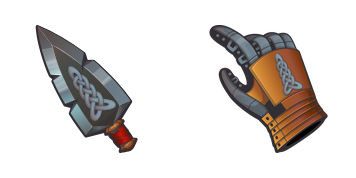
Ritter Custom Cursor Pack mit süßem Cursor für Fans des Themas.

✨ Move your mouse to test both cursors
Arrow Cursor

Default navigation pointer

Pointer Cursor

Used for clickable elements

Hover over each side to preview both cursor styles in real-time.

1,000+
Der Knight Cursor von der Cursors Collection fügt Ihrem Browser-Erlebnis einen Hauch von mittelalterlichem Flair hinzu. Der Cursor verfügt über ein kompliziertes Design eines Ritterhelms mit Visor und Stift. Seine glatte Animation und hochwertige Details machen es zu einem Vergnügen. Egal, ob Sie ein Fan von historischen Neuerungen sind oder nur ein bisschen Witz zu Ihrem Surfen hinzufügen möchten, der Knight Cursor ist eine großartige Wahl. Laden Sie es heute herunter und genießen Sie jedes Mal einen kleinen mittelalterlichen Charme, wenn Sie im Web surfen.Die Kollektion Colored bietet verschiedene Cursor-Pakete, sodass jeder etwas für sich finden kann.

You may also like

Explore other cursor packs from our collection

von Jason Statham Cursor-Paket

von Jason Statham Cursor-Paket

Probier von Jason Statham: süßes Cursor Pack und fertige Custom Cursors.

Krone und Herz Cursor-Paket

Krone und Herz Cursor-Paket

Krone und Herz Custom Cursor Pack mit süßem Cursor für Fans des Themas.

Der Ballon Cursor-Paket

Der Ballon Cursor-Paket

Süßer Cursor Der Ballon frischt Klicks auf - free Custom Cursor für den PC.

Salate auf dem Spiel Cursor-Paket

Salate auf dem Spiel Cursor-Paket

Lade Salate auf dem Spiel - cute Cursor und Custom Cursor für den Alltag.

Arrow Cursor-Paket

Arrow Cursor-Paket

Probier Arrow: süßes Cursor Pack und fertige Custom Cursors.

Shovel Cursor-Paket

Shovel Cursor-Paket

Süßer Cursor Shovel frischt Klicks auf - free Custom Cursor für den PC.

Wissenstag Stift Cursor-Paket

Wissenstag Stift Cursor-Paket

Süßer Cursor Wissenstag Stift frischt Klicks auf - free Custom Cursor für den PC.

Ornaments Cursor-Paket

Ornaments Cursor-Paket

Ornaments: süßer Cursor und Custom Cursor Pack für Browser und Windows.

How to Install Ritter cursors

How to Install cursor Ritter for Chrome

Ritter preview

Ritter

Ritter Custom Cursor Pack mit süßem Cursor für Fans des Themas.

  1. 1
    Go to Chrome Web Store

    Hit the 'Add to Browser' button to get the 'Ritter' pack.

  2. 2
    Add the Extension

    On the Chrome Web Store, smash that ‘Add to Chrome’ button and confirm.

  3. 3
    Pin for Easy Access

    Pro-tip: Pin the 'Cute Cursors' extension to your toolbar for quick access.

  4. 4
    Activate Your Cursor

    Open the extension, find the 'Ritter' pack, and click to activate. Easy peasy!

Piece of cake, right? Go on and have fun!

Didn't Find Your Vibe?

Our universe of cursors is huge. Dive into hundreds of unique collections and find the one that truly represents you.

Explore All Collections