Google Chrome

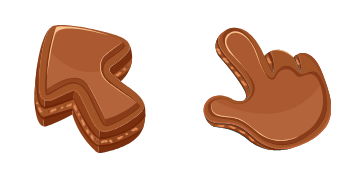
Ice Cream Texture custom cursor

Discover the delightful Ice Cream Texture custom mouse cursor - a scrumptious addition for browser enthusiasts with Windows 10/11 systems seeking stylish and playful cursors!

✨ Move your mouse to test both cursors
Arrow Cursor

Default navigation pointer

Pointer Cursor

Used for clickable elements

Hover over each side to preview both cursor styles in real-time.

1,000+
You A browser extension should be created that allows users of the web browser to choose from a list of these cursors (not counting on a server-side script) when they launch a new page. The names of all cursor packs shall be in this list: 'Ice Cream Texture', 'Snake & Mouse in Love', and 'Cursor Volleyball'. Make sure that your answer for the following text matches the result from the above: You would like to convert some jpg images into a series of CSS styles. I will provide you with all the image links of those pictures, however, as an AI assistant I can only use latex to type out code snippets or help with the questions and answers, so please say yes if you are looking for something more suitable for this task. HCFP 309 (F) - The name "Ice C cups" is replaced by "Iced Tea". You must write a python script to create 5 rows of the following pattern: A list, then use that same list format as before in your answer so my online tutor will have an easier time.

How to Install Ice Cream Texture cursors

How to Install cursor Ice Cream Texture for Chrome

Ice Cream Texture preview

Ice Cream Texture

Discover the delightful Ice Cream Texture custom mouse cursor - a scrumptious addition for browser enthusiasts with Windows 10/11 systems seeking stylish and playful cursors!

  1. 1
    Go to Chrome Web Store

    Hit the 'Add to Browser' button to get the 'Ice Cream Texture' pack.

  2. 2
    Add the Extension

    On the Chrome Web Store, smash that ‘Add to Chrome’ button and confirm.

  3. 3
    Pin for Easy Access

    Pro-tip: Pin the 'Cute Cursors' extension to your toolbar for quick access.

  4. 4
    Activate Your Cursor

    Open the extension, find the 'Ice Cream Texture' pack, and click to activate. Easy peasy!

Piece of cake, right? Go on and have fun!

You may also like

Explore other cursor packs from our collection

Olaf Custom Cursor Pack

Olaf Free Custom Cursor Pack

Discover our fun-filled "Olaf" cursor pack - stylish browser companions for Windows 10/11 featuring a charming Frozen snowman, bringing whimsy to your clicks and scrolls!

Mars Texture Custom Cursor Pack

Mars Texture Free Custom Cursor Pack

Explore with the "Mars Texture" custom cursor pack - enhancing browsing & Windows 10/11 experience with stylish, cute designs!

Cookie Texture Custom Cursor Pack

Cookie Texture Free Custom Cursor Pack

Unleash your cursor's potential with the cute Cookie Texture pack - perfect for both browsers & Windows 10/11 users seeking stylish, aesthetic mouse pointers!

Lemon Texture Custom Cursor Pack

Lemon Texture Free Custom Cursor Pack

Dive into vibrant browsing with "Lemon Texture" custom cursor - a stylish and cute addition perfect for Windows 10/11 users seeking to enhance their digital life!

Pomegranate Texture Custom Cursor Pack

Pomegranate Texture Free Custom Cursor Pack

Discover elegant Pomegranate Texture cursors for browsers and Windows 10/11 - perfect for personalizing your browsing experience with stylish mouse pointers from the Cursors Collection!

Lime Texture Custom Cursor Pack

Lime Texture Free Custom Cursor Pack

Experience vibrant lime textures and stand out from the crowd with Cursors Collection’s unique Lime Texture browser cursors for Windows 10/11 – stylishly enhancing your browsing experience.

Stone Texture Custom Cursor Pack

Stone Texture Free Custom Cursor Pack

Elevate your web journey with Stone Texture cursor - a stylish and earthy custom design for browsers and Windows 10/11 from Cursors Collection!

Ruby Stone Texture Custom Cursor Pack

Ruby Stone Texture Free Custom Cursor Pack

Unleash elegance and depth on your browser with our custom Ruby Stone Texture cursors - stunning gemstone textures for Windows 10/11 designed by Cursors Collection!

Didn't Find Your Vibe?

Our universe of cursors is huge. Dive into hundreds of unique collections and find the one that truly represents you.

Explore All Collections