Google Chrome

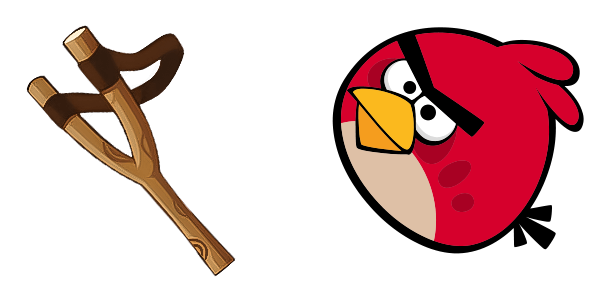
Angry Birds custom cursor

Elevate your browsing with Angry Birds custom cursors for browsers & Windows - easy-to-install stylish cursor pack that brings fun to every click!

✨ Move your mouse to test both cursors
Arrow Cursor

Default navigation pointer

Pointer Cursor

Used for clickable elements

Hover over each side to preview both cursor styles in real-time.

1,000+

Experience Angry Birds Fun on Your Screen

Imagine having the joy and excitement of "Angry Birds" by your side as you navigate through your digital world. Introducing our specially crafted cursor pack, "Angry Birds", designed to bring a touch of fun and playfulness to your browsing experience.

Available for web browsers such as Chrome and Edge through official extensions, this custom cursor pack offers the convenience of integrating an enjoyable and interactive element into your daily online activities. Our "Angry Birds" cursors are compatible with Windows 10 and Windows 11 platforms as well, ensuring a seamless experience across devices.

Our passionate team of designers took inspiration from the animated world of Angry Birds to create this collection of cute, kawaii, and stylish mouse pointers. Each cursor is meticulously designed with an artistic flair that captures the essence of your favorite characters while maintaining a sleek, modern aesthetic.

The inspiration behind our "Angry Birds" cursors came from our desire to create fun desktop elements that are both functional and visually delightful. Our team spent countless hours studying the game's animation style and character design, resulting in an animated cursor pack that truly embodies the spirit of Angry Birds.

This fanart.

How to Install Angry Birds cursors

How to Install cursor Angry Birds for Chrome

Angry Birds preview

Angry Birds

Elevate your browsing with Angry Birds custom cursors for browsers & Windows - easy-to-install stylish cursor pack that brings fun to every click!

  1. 1
    Go to Chrome Web Store

    Hit the 'Add to Browser' button to get the 'Angry Birds' pack.

  2. 2
    Add the Extension

    On the Chrome Web Store, smash that ‘Add to Chrome’ button and confirm.

  3. 3
    Pin for Easy Access

    Pro-tip: Pin the 'Cute Cursors' extension to your toolbar for quick access.

  4. 4
    Activate Your Cursor

    Open the extension, find the 'Angry Birds' pack, and click to activate. Easy peasy!

Piece of cake, right? Go on and have fun!

You may also like

Explore other cursor packs from our collection

Street Fighter Ryu Hadouken Custom Cursor Pack

Street Fighter Ryu Hadouken Free Custom Cursor Pack

Elevate your digital battles with our Street Fighter Ryu Hadouken cursor pack – a stylish fusion of browser and Windows cursors that brings gaming icon Ryu's dedication to mastery right to your screen!

Night in the Woods Bea Santello & Ankh Custom Cursor Pack

Night in the Woods Bea Santello & Ankh Free Custom Cursor Pack

Discover an enigmatic browsing experience with our custom "Night in the Woods" Bea Santello & Ankh cursor pack – a stylish tribute to her cool and charismatic presence on your Windows 10/11 system!

Lightsaber Custom Cursor Pack

Lightsaber Free Custom Cursor Pack

Experience a new level of browsing with our Lightsaber Cursor Pack - customizable browser and Windows 10/11 cursors designed for Star Wars fans and the curious alike!

Sifu Custom Cursor Pack

Sifu Free Custom Cursor Pack

Elevate your gaming with the stylish "Sifu" cursors from the Games Cursor Collection - perfect for browsers and Windows 10/11!

Arc Warden Custom Cursor Pack

Arc Warden Free Custom Cursor Pack

Discover stylish mouse pointer fun with our Arc Warden cursor pack - perfect for Windows 10/11, designed by top artists, and easy to install!

Plants vs. Zombies Basic Zombie Custom Cursor Pack

Plants vs. Zombies Basic Zombie Free Custom Cursor Pack

Dive into the zombie apocalypse on your computer screen! The Plants vs. Zombies Basic Zombie animated cursor from the Games Cursor Collection is here to entertain you with its stylish design and cute aesthetic for both browsers and Windows 10/11.

Destiny Games Custom Cursor Pack

Destiny Games Free Custom Cursor Pack

Enhance your browsing experience with our custom Destiny Games mouse cursors - stylish and fun for both browsers and Windows 10/11!

Just Shapes & Beats Specter Boss & Scythe Custom Cursor Pack

Just Shapes & Beats Specter Boss & Scythe Free Custom Cursor Pack

Elevate your browsing experience with our unique "Just Shapes & Beats Specter Boss & Scythe" animated cursor from the Games Cursor Collection - a stylish and cute addition to both browser and Windows 10/11 cursors!

Didn't Find Your Vibe?

Our universe of cursors is huge. Dive into hundreds of unique collections and find the one that truly represents you.

Explore All Collections