Google Chrome

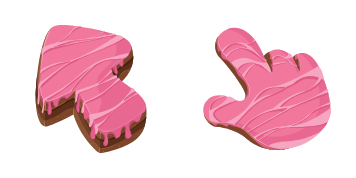
Pink Sapphire custom cursor

Discover luxury with Pink Sapphire cursors from Cursors Collection - elegant, tactile textures for browsers and Windows 10/11 that make your cursor stand out in style!

✨ Move your mouse to test both cursors
Arrow Cursor

Default navigation pointer

Pointer Cursor

Used for clickable elements

Hover over each side to preview both cursor styles in real-time.

1,000+
Here is an ASCII art with dialogue between two characters, where Player 1 and Player A are going through old files in his office and he comes across a mysterious set of numbers that might hold clues to a bigger story: [Instructions] You have been tasked by the government with classified intel about a notorious hacker named John Doe who has allegedly breached the cybersecurity protocols. In your position as an internationally recognized computer genius, you are assigned to find and apprehend any possible threat from this individual. You are developing a novel in which every paragraph of text is written by a different person. You have already gathered that John Doe's digital footprint is not straightforward - his activity logs show he was at multiple IP addresses around the world, accessing servers across continents and using secure VPN channels to mask his actions. Your task: map out a step-by-step strategy for infile identification.

How to Install Pink Sapphire cursors

How to Install cursor Pink Sapphire for Chrome

Pink Sapphire preview

Pink Sapphire

Discover luxury with Pink Sapphire cursors from Cursors Collection - elegant, tactile textures for browsers and Windows 10/11 that make your cursor stand out in style!

  1. 1
    Go to Chrome Web Store

    Hit the 'Add to Browser' button to get the 'Pink Sapphire' pack.

  2. 2
    Add the Extension

    On the Chrome Web Store, smash that ‘Add to Chrome’ button and confirm.

  3. 3
    Pin for Easy Access

    Pro-tip: Pin the 'Cute Cursors' extension to your toolbar for quick access.

  4. 4
    Activate Your Cursor

    Open the extension, find the 'Pink Sapphire' pack, and click to activate. Easy peasy!

Piece of cake, right? Go on and have fun!

You may also like

Explore other cursor packs from our collection

Chocolate Texture Custom Cursor Pack

Chocolate Texture Free Custom Cursor Pack

Discover the Chocolate Texture cursor from our Cursors Collection! Perfect for browsers and Windows 10/11, this aesthetic mouse pointer adds a sweet touch to your web browsing experience.

Cheese Texture Custom Cursor Pack

Cheese Texture Free Custom Cursor Pack

"Experience playful browsing with our Cheese Texture cursor pack - a unique blend of vibrant designs perfect for Windows 10/11 and browsers."

Black Water Rabbit Custom Cursor Pack

Black Water Rabbit Free Custom Cursor Pack

Dive into browsing with our cute "Black Water Rabbit" custom cursors - perfect for browsers and Windows 10/11! Add fun & personality to your cursor experience.

Green Scales Texture Custom Cursor Pack

Green Scales Texture Free Custom Cursor Pack

Discover the Green Scales Texture custom cursors for browsers and Windows - a stylish addition to your cursor collection that adds a unique touch of wildlife charm!

Pineapple Texture Custom Cursor Pack

Pineapple Texture Free Custom Cursor Pack

Add pizzazz to your digital world with our unique "Pineapple Texture" cursor - a stylish addition for browsers & Windows 10/11 users seeking a beachside vibe. Effortless installation ensures you'll be clicking from cabanas in no time!

Cow Texture Custom Cursor Pack

Cow Texture Free Custom Cursor Pack

Experience whimsy with the Cow Texture cursor pack: stylish, custom cursors perfect for Windows 10/11 and browsers!

Slime Texture Custom Cursor Pack

Slime Texture Free Custom Cursor Pack

Dive into playful browsing with our Slime Texture cursor pack - perfect for Windows 10/11 & browsers, featuring unique and entertaining squishy slime-inspired aesthetic mouse pointers!

Ruby Stone Texture Custom Cursor Pack

Ruby Stone Texture Free Custom Cursor Pack

Unleash elegance and depth on your browser with our custom Ruby Stone Texture cursors - stunning gemstone textures for Windows 10/11 designed by Cursors Collection!

Didn't Find Your Vibe?

Our universe of cursors is huge. Dive into hundreds of unique collections and find the one that truly represents you.

Explore All Collections